
News Button for YouTube
YouTube removed the News button, but the page still works. This brings it back and lets you open other countries' News too.
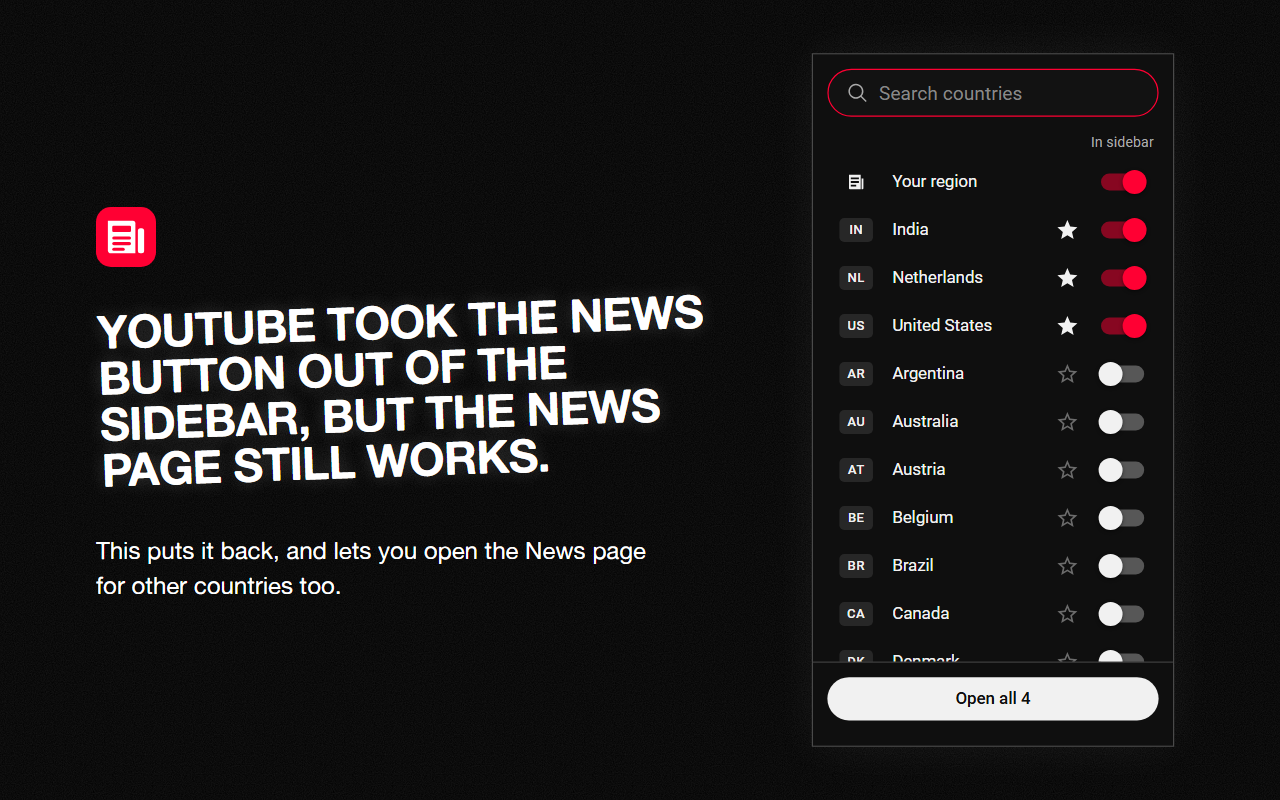
What it does
YouTube took the News button out of its sidebar. The News page is still there, with the same headlines and videos, but there's no button to get to it anymore. There's also no way to see what the News page looks like in other countries.
This extension puts a News section back in the sidebar, between You and Explore, and lets you open the News page for other countries too.
How it works
- Click the extension icon, then a country, to open that country's News page.
- Ctrl-click or middle-click to open it in a background tab and keep the list open.
- The switch next to a country shows it in the sidebar's News section.
- "Open all" (or Alt+Shift+N) opens every country that's switched on.
Install
Chrome Web Store link coming soon. Until then, install it by hand:
- Download news-button-1.0.0.zip (64 KB) and unzip it.
- Go to
chrome://extensionsand turn on Developer mode. - Click Load unpacked and pick the unzipped folder.
Privacy
The extension does not collect, transmit, sell, or share any personal data. There is no server, and nothing is sent to me.
It saves one thing: which countries you've switched on (for example US, IN, NL). This is kept in Chrome's built-in chrome.storage.sync. If Chrome Sync is on, Google syncs this list between your own signed-in browsers, under Google's Privacy Policy. I can't see it, and uninstalling the extension deletes it.
- No analytics, tracking, cookies, or ads.
- No network requests of its own. The font is bundled with the extension.
- On YouTube it only adds the News section to the left sidebar. It looks at which links are in the sidebar to put the section in the right place. Nothing else on the page is read.
- Clicking a News link opens a normal
youtube.compage, as if you had typed the address yourself.
| Permission | Why |
|---|---|
storage | Remembers which countries you've switched on. |
https://www.youtube.com/* | Adds the News section to YouTube's sidebar. |
If this policy changes, the new version will be posted here with a new date.